
Qucs - X 64-bit Download
Popular x64 Tags
- autocad x64 download
- solidworks x64 download
- intellicad x64 download
- dxf x64 download
- dwg x64 download
- architectural x64 download
- visualization x64 download
- cad x64 download
- home x64 download
- design x64 download
- hpgl x64 download
- progecad x64 download
- animation x64 download
- fence x64 download
- cam x64 download
- dwg to pdf x64 download
- architect x64 download
- viz x64 download
- vrml x64 download
- convert x64 download
- gear x64 download
- landscape x64 download
- deck x64 download
- strength check x64 download
- batch x64 download
- garden x64 download
- yard x64 download
- gardening x64 download
- landscaping x64 download
- backyard x64 download
Qucs 0.0.19
Sponsored links:

Michael Margraf

Qucs is a circuit simulator with graphical user interface. The software aims to support all kinds of circuit simulation types, e.g. DC, AC, S-parameter, Harmonic Balance analysis, noise analysis, etc.
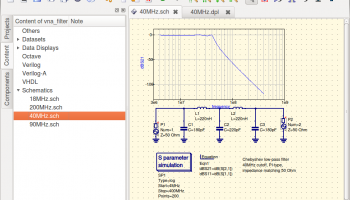
Qucs stands for Quite Universal Circuit Simulator. So far Qucs is not yet finished, but it is already packed with features. Take a look at the screenshots to get a feel for what it can do.
Qucs is an integrated circuit simulator which means you are able to setup a circuit with a graphical user interface (GUI) and simulate the large-signal, small-signal and noise behaviour of the circuit. After that simulation has finished you can view the simulation results on a presentation page or window.
Qucs, briefly for Quite Universal Circuit Simulator, is a circuit simulator with graphical user interface (GUI). The GUI is based on Qt® by Digia®. The software aims to support all kinds of circuit simulation types, e.g. DC, AC, S-parameter, Harmonic Balance analysis, noise analysis, etc.
Qucsator, the simulation backend, is a command line circuit simulator. It takes a network list in a certain format as input and outputs a Qucs dataset. It has been programmed for usage in the Qucs project but may also be used by other applications.
The Qucs GUI is well advanced and allows setting up schematics and presenting simulation results in various types of diagrams. DC, AC, S-parameter, noise and transient analysis is possible, mathematical equations and use of a subcircuit hierarchy (with parameterised subcircuits) are available. Qucs can also import existing SPICE models for use in your simulations.
While Qucs is well developed, we still strive to improve the project, and will always welcome offers of help. Qucs doesn't just need help with programming, it also needs graphics, high quality example schematics, tutorials for the website and lots more.
Qucs comes with a huge array of components and models including HICUM, BSIM2, BSIM3, and soon BSIM6. It also provides many semiconductor based components and models such as OpAmps, Diodes, MOSFETs, PMOSFETs and many more. Some example schematics can be found here which demonstrate some of the abilities of Qucs, and many more examples are provided with the program.
Qucs stands for Quite Universal Circuit Simulator. So far Qucs is not yet finished, but it is already packed with features. Take a look at the screenshots to get a feel for what it can do.
Qucs is an integrated circuit simulator which means you are able to setup a circuit with a graphical user interface (GUI) and simulate the large-signal, small-signal and noise behaviour of the circuit. After that simulation has finished you can view the simulation results on a presentation page or window.
Qucs, briefly for Quite Universal Circuit Simulator, is a circuit simulator with graphical user interface (GUI). The GUI is based on Qt® by Digia®. The software aims to support all kinds of circuit simulation types, e.g. DC, AC, S-parameter, Harmonic Balance analysis, noise analysis, etc.
Qucsator, the simulation backend, is a command line circuit simulator. It takes a network list in a certain format as input and outputs a Qucs dataset. It has been programmed for usage in the Qucs project but may also be used by other applications.
The Qucs GUI is well advanced and allows setting up schematics and presenting simulation results in various types of diagrams. DC, AC, S-parameter, noise and transient analysis is possible, mathematical equations and use of a subcircuit hierarchy (with parameterised subcircuits) are available. Qucs can also import existing SPICE models for use in your simulations.
While Qucs is well developed, we still strive to improve the project, and will always welcome offers of help. Qucs doesn't just need help with programming, it also needs graphics, high quality example schematics, tutorials for the website and lots more.
Qucs comes with a huge array of components and models including HICUM, BSIM2, BSIM3, and soon BSIM6. It also provides many semiconductor based components and models such as OpAmps, Diodes, MOSFETs, PMOSFETs and many more. Some example schematics can be found here which demonstrate some of the abilities of Qucs, and many more examples are provided with the program.
OS: Windows 2000, Windows 2003, Windows XP, Windows Vista, Windows Vista x64, Windows 7, Windows 7 x64, Windows 8, Windows 8 x64, Windows 10, Windows 10 x64, Linux, Mac OS X
Add Your Review or 64-bit Compatibility Report
Top CAD 64-bit downloads


Tracfoil 4.12.07
Edit and print your ribs and airfoils templates from data
Trialware
tags: Cad, model, aircraft, plane, airfoil plotting, rib plotting, airfoil to DXF, airfoil, plot, rib

nanoCAD 5.1.2524.2017
nanoCAD - easy-to-use free CAD software delivering great user experience.
Freeware


MapInfo Professional 17.0.4
Location-based decisions: Explore, model and act with confidence
Trialware | $1 995.00
DICOMscope 3.5.1
A free DICOM viewer which can display uncompressed, monochrome DICOM images
Freeware


CrystalMaker 11.1.0
A full-featured scientific program, supporting the major database file formats
Demo | $499.00

Members area
Top 64-bit Downloads
-
Fluid Mask for Mac 3.3.14
x64 trialware download -
ICO file format x64 2.1f1
x64 open source download -
Archicad 64bit 27 B3001
x64 demo download -
TopSpice 10.26a
x64 demo download -
WellCAD x64 5.3 B625
x64 demo download -
Portable MicroDicom x64 2024.2
x64 freeware download -
Adobe Photoshop Elements 2024.3
x64 trialware download -
Potrace for Windows (x64
bit) 1.16
x64 open source download -
delaboratory x64 0.8
x64 open source download -
AcroPDF 6.2
x64 shareware download
Top Downloads
-
CorelDRAW X5 2026 v27.0.0.121
trialware download -
Tracfoil 4.12.07
trialware download -
oCam 428.0
freeware download -
Gyazo 5.9.1
demo download -
nanoCAD 5.1.2524.2017
freeware download -
MarvinSketch 23.16.0
freeware download -
MapInfo Professional 17.0.4
trialware download -
Scanahand 8.0.0.320
demo download -
iWisdom 0.0.0+2107~ga0785ce1
open source download -
CodeLoader 4.19.0
freeware download -
SeiSee 2.22.6
freeware download -
XnConvert 1.106.0
shareware download -
VueScan 9.8.53
demo download -
Topaz Simplify 4.1.1
trialware download -
World Tools 2.0.6
shareware download