
SessionBox - X 64-bit Download
Popular x64 Tags
- mozilla x64 download
- internet explorer toolbar x64 download
- browser x64 download
- netscape x64 download
- toolbar x64 download
- ie toolbar x64 download
- firefox x64 download
- free toolbar x64 download
- favorites organizer x64 download
- internet explorer x64 download
- favorites x64 download
- internet x64 download
- bookmarks x64 download
- add ons x64 download
- browser toolbar x64 download
- bookmark manager x64 download
- theme x64 download
- explorer x64 download
- addons x64 download
- cache x64 download
- skin x64 download
- web x64 download
- backup x64 download
- golf x64 download
- anarchy bar anarchy x64 download
- golf pro x64 download
- mhfs rss rss feed reader x64 download
- golf leader x64 download
- womens golf x64 download
- ladies golf x64 download
SessionBox 1.8.9
Sponsored links:
license: Demo
downloads: 45
size: 2.60 MB
updated: 2024-09-10
tags: Account, Session, browser extension, online privacy, Viktor Horvath, SessionBox, session management, multi-account, Multi-Session, SessionBox free download, Multi Login Manager, Manage Browsing Sessions, Login, download SessionBox, Browsing Session
Add to Basket

Viktor Horvath

**SessionBox: Revolutionizing Multi-Session Browsing**
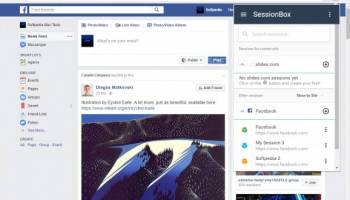
SessionBox, developed by Viktor Horvath, is a groundbreaking browser extension designed to streamline and enhance the multi-session browsing experience. This innovative tool is a game-changer for users who need to manage multiple online accounts simultaneously without the hassle of switching browsers or using incognito mode.
**Key Features:**
1. **Multiple Sessions in a Single Window:**
SessionBox allows users to open multiple sessions within a single browser window. Each tab operates independently, enabling seamless access to different accounts on the same website without interference. This is particularly useful for social media managers, marketers, and anyone who juggles multiple identities online.
2. **Session Synchronization:**
One of the standout features of SessionBox is its ability to synchronize sessions across devices. Users can start a session on one device and continue it on another, ensuring a smooth and uninterrupted workflow. This cross-device compatibility is a boon for professionals who work on the go.
3. **Secure and Private:**
Security is a top priority for SessionBox. The extension ensures that session data is stored securely and is only accessible by the user. This means that sensitive information remains protected, giving users peace of mind when managing multiple accounts.
4. **User-Friendly Interface:**
The extension boasts an intuitive and user-friendly interface. Setting up and managing sessions is straightforward, with clear instructions and minimal setup required. The clean design ensures that even those who are not tech-savvy can navigate the tool with ease.
5. **Customizable Sessions:**
SessionBox offers customization options that allow users to label and color-code their sessions for easy identification. This feature is particularly useful for users who manage a large number of sessions and need a quick way to differentiate between them.
6. **Resource Efficiency:**
Unlike running multiple instances of a browser or using virtual machines, SessionBox is resource-efficient. It minimizes the strain on system resources, ensuring that your computer runs smoothly even with numerous active sessions.
**Use Cases:**
- **Social Media Management:** Manage multiple social media accounts without logging in and out repeatedly.
- **QA Testing:** Test web applications with different user accounts simultaneously.
- **Freelancers and Remote Workers:** Handle various client accounts without mixing data.
- **E-commerce:** Manage multiple seller accounts on platforms like eBay or Amazon.
**Conclusion:**
SessionBox by Viktor Horvath is an indispensable tool for anyone who needs to manage multiple online sessions efficiently. Its robust features, coupled with a focus on security and ease of use, make it a must-have extension for professionals and casual users alike. Whether you're a social media manager, a QA tester, or simply someone who needs to keep personal and work accounts separate, SessionBox offers a seamless and secure solution to your multi-session browsing needs.
SessionBox, developed by Viktor Horvath, is a groundbreaking browser extension designed to streamline and enhance the multi-session browsing experience. This innovative tool is a game-changer for users who need to manage multiple online accounts simultaneously without the hassle of switching browsers or using incognito mode.
**Key Features:**
1. **Multiple Sessions in a Single Window:**
SessionBox allows users to open multiple sessions within a single browser window. Each tab operates independently, enabling seamless access to different accounts on the same website without interference. This is particularly useful for social media managers, marketers, and anyone who juggles multiple identities online.
2. **Session Synchronization:**
One of the standout features of SessionBox is its ability to synchronize sessions across devices. Users can start a session on one device and continue it on another, ensuring a smooth and uninterrupted workflow. This cross-device compatibility is a boon for professionals who work on the go.
3. **Secure and Private:**
Security is a top priority for SessionBox. The extension ensures that session data is stored securely and is only accessible by the user. This means that sensitive information remains protected, giving users peace of mind when managing multiple accounts.
4. **User-Friendly Interface:**
The extension boasts an intuitive and user-friendly interface. Setting up and managing sessions is straightforward, with clear instructions and minimal setup required. The clean design ensures that even those who are not tech-savvy can navigate the tool with ease.
5. **Customizable Sessions:**
SessionBox offers customization options that allow users to label and color-code their sessions for easy identification. This feature is particularly useful for users who manage a large number of sessions and need a quick way to differentiate between them.
6. **Resource Efficiency:**
Unlike running multiple instances of a browser or using virtual machines, SessionBox is resource-efficient. It minimizes the strain on system resources, ensuring that your computer runs smoothly even with numerous active sessions.
**Use Cases:**
- **Social Media Management:** Manage multiple social media accounts without logging in and out repeatedly.
- **QA Testing:** Test web applications with different user accounts simultaneously.
- **Freelancers and Remote Workers:** Handle various client accounts without mixing data.
- **E-commerce:** Manage multiple seller accounts on platforms like eBay or Amazon.
**Conclusion:**
SessionBox by Viktor Horvath is an indispensable tool for anyone who needs to manage multiple online sessions efficiently. Its robust features, coupled with a focus on security and ease of use, make it a must-have extension for professionals and casual users alike. Whether you're a social media manager, a QA tester, or simply someone who needs to keep personal and work accounts separate, SessionBox offers a seamless and secure solution to your multi-session browsing needs.
OS: Windows 11, Windows 10 64 bit
Add Your Review or 64-bit Compatibility Report
Top Browser Tools 64-bit downloads


Web Archives for Opera 7.3.0
Effortlessly save and manage web pages with this intuitive Opera extension.
Open Source


Chrono Download Manager 0.13.10
Effortlessly manage and accelerate your downloads with Chrono Download Manager.
Freeware


Mailtrack for Chrome 12.68.6

Mailtrack for Chrome: Email tracking with read receipts for Gmail users.
Shareware | $9.99

TagSpaces Web Clipper for Chrome 4.1.3
Organize your files effortlessly with TagSpaces' intuitive tagging system.
Freeware


MetaMask for Chrome 13.24.0
Seamlessly manage your Ethereum assets and interact with decentralized apps.
Open Source

Kami 2.0.22844
Transform PDFs and documents into interactive, collaborative experiences.
Trialware | $149.00
Members area
Top 64-bit Downloads
-
Adobe Flash Player 10
for 64-bit Windows Preview 2
x64 freeware download -
FileZilla Server 1.8.1
x64 open source download -
Internet Explorer 8 for
Windows Vista 64-bit and
Windows Server 2008
64-bit
x64 freeware download -
Firefox 64bit x64 127.0.2
x64 open source download -
SSuite NetSurfer Extreme
x64 2.10.16.1
x64 freeware download -
Google Chrome x64 bit 126.0.6478.127
x64 freeware download -
SSuite NetSurfer Browser
x64 2.30.16.10
x64 freeware download -
WatchFTP x64 4.2.1.0
x64 trialware download -
Heroix Longitude for
VMware x64 10.0.1
x64 trialware download -
Xlight FTP Server
Professional x64 3.9.4.2
x64 trialware download
Top Downloads
-
Adobe Flash Player 10
for 64-bit Windows Preview 2
freeware download -
MiraxTV 2024.5
freeware download -
Xftp Free 7.0 B0155
freeware download -
Profile Migrator 1.1
trialware download -
Web Archives for Opera 7.3.0
open source download -
TheWorld Browser 7.0.0.108
freeware download -
MusicFab 1.0.6.6
demo download -
Virtual World 4.7.4
commercial download -
Open With Photoshop 63.0
open source download -
NetShareWatcher 1.5.8
shareware download -
Chrono Download Manager 0.13.10
freeware download -
Dooble 2024.12.31
open source download -
GetRight 6.5
shareware download -
MP4 Downloader 6.3.0
trialware download -
Vuze 5.7.7.0
freeware download