
Simstat - X 64-bit Download
Popular x64 Tags
- autocad x64 download
- solidworks x64 download
- intellicad x64 download
- dxf x64 download
- dwg x64 download
- architectural x64 download
- visualization x64 download
- cad x64 download
- home x64 download
- design x64 download
- hpgl x64 download
- progecad x64 download
- animation x64 download
- fence x64 download
- cam x64 download
- dwg to pdf x64 download
- architect x64 download
- viz x64 download
- vrml x64 download
- convert x64 download
- gear x64 download
- landscape x64 download
- deck x64 download
- strength check x64 download
- batch x64 download
- garden x64 download
- yard x64 download
- gardening x64 download
- landscaping x64 download
- backyard x64 download
Simstat 2.6
Sponsored links:

Kovach Computing Services

SIMSTAT for Windows is an innovative product that goes beyond mere statistical analysis. It offers output management features not found in any other program as well as its own scripting language to automate statistical analysis and to write small applications, interactive tutorials with multimedia capabilities, as well as computer assisted interviewing systems.
It also has an innovative Results Notebook for compiling your statistical results alongside notes and annotations. It can import data from various database and spreadsheet formats as well as ASCII and SPSS files.
Data Management
The data window is a spreadsheet like data editor where values can be entered, browsed, or edited. It has the following features:
- Reads standard DBF files up to 1024 variables (or fields). Can import and export comma or tab separated text files, Paradox, Lotus 1-2-3, Symphony, Excel, Quattro Pro, - SPSS/PC+ and SPSS for Windows files.
- Supports variable and value labels and up to 3 missing values
- Records can be filtered using valid xBase expressions
- Records can be sorted on one or several variables or on results of xBase expressions
- Supports data transformation (including conditional transformation), recoding, ranking. Provides more than 50 transformation functions including trigonometric, statistical, random number functions.
Output Management
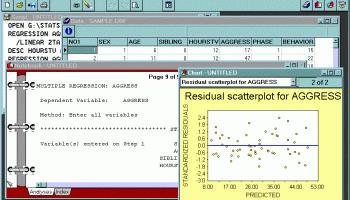
The notebook window displays the statistical output for all analyses performed during a session. The notebook metaphor provides an efficient way to browse and manage results.
The text output of each analysis is displayed on a separate page. You can turn pages either with the mouse by clicking on the page flip icons at the bottom of the notebook or by keyboard keys. While each page can be annotated or edited, it is also possible to add empty pages in order to put down ideas or remarks, sketch an analysis plan, or write down interpretation of results.
Tabs can be added to create sections in the notebook allowing you to store different kinds of analysis in different sections of the notebook. An index of all analysis is automatically generated. This index can be used to quickly locate and go to a specific page, move pages within the notebook, or delete some pages.
Graphics
The charts window displays all high-resolution charts created during a session. It allows you full control of axis, labels, legends, colours, line drawing, etc. The resulting graphics can be exported to disk in Windows Metafile format or copied to the clipboard as a picture, Windows Metafile, or tab separated values.
Scripting
The script window is used to enter and edit commands. Those commands can be either read from a script file on disk, typed in by the user or automatically generated by the program. When used with the RECORD feature, the script can also be used as a log window to keep track of the analysis performed during a session. Those commands may then be executed again, providing an efficient way to automate statistical analysis. Additional commands also allows one to create demonstration programs, computer assisted teaching lessons, and even computer assisted data entry:
- Statistical analysis, data filtering and transformation commands
- Record script feature to automatically generate commands corresponding to operations performed with menus and dialog boxes.
- Flow control features such as IF-THEN-ELSE statements, GOTO or GOSUB commands, RUN command to run external programs, etc.
- Can read, write, and perform mathematical operations on user defined variables or any database field
- Create menus, text boxes, input boxes, dialog boxes, multiple items questions, etc. (responses from a user can be stored in memory variables or in a data file)
Multimedia features: play sound (.WAV), music (.MDI), and movie (.AVI) files, display graphics (.BMP) and text.
Add-ins
SIMSTAT for Windows has a wide range of add-ins that allows you to extend the capabilities of the program.
Capability
The program can handle u
It also has an innovative Results Notebook for compiling your statistical results alongside notes and annotations. It can import data from various database and spreadsheet formats as well as ASCII and SPSS files.
Data Management
The data window is a spreadsheet like data editor where values can be entered, browsed, or edited. It has the following features:
- Reads standard DBF files up to 1024 variables (or fields). Can import and export comma or tab separated text files, Paradox, Lotus 1-2-3, Symphony, Excel, Quattro Pro, - SPSS/PC+ and SPSS for Windows files.
- Supports variable and value labels and up to 3 missing values
- Records can be filtered using valid xBase expressions
- Records can be sorted on one or several variables or on results of xBase expressions
- Supports data transformation (including conditional transformation), recoding, ranking. Provides more than 50 transformation functions including trigonometric, statistical, random number functions.
Output Management
The notebook window displays the statistical output for all analyses performed during a session. The notebook metaphor provides an efficient way to browse and manage results.
The text output of each analysis is displayed on a separate page. You can turn pages either with the mouse by clicking on the page flip icons at the bottom of the notebook or by keyboard keys. While each page can be annotated or edited, it is also possible to add empty pages in order to put down ideas or remarks, sketch an analysis plan, or write down interpretation of results.
Tabs can be added to create sections in the notebook allowing you to store different kinds of analysis in different sections of the notebook. An index of all analysis is automatically generated. This index can be used to quickly locate and go to a specific page, move pages within the notebook, or delete some pages.
Graphics
The charts window displays all high-resolution charts created during a session. It allows you full control of axis, labels, legends, colours, line drawing, etc. The resulting graphics can be exported to disk in Windows Metafile format or copied to the clipboard as a picture, Windows Metafile, or tab separated values.
Scripting
The script window is used to enter and edit commands. Those commands can be either read from a script file on disk, typed in by the user or automatically generated by the program. When used with the RECORD feature, the script can also be used as a log window to keep track of the analysis performed during a session. Those commands may then be executed again, providing an efficient way to automate statistical analysis. Additional commands also allows one to create demonstration programs, computer assisted teaching lessons, and even computer assisted data entry:
- Statistical analysis, data filtering and transformation commands
- Record script feature to automatically generate commands corresponding to operations performed with menus and dialog boxes.
- Flow control features such as IF-THEN-ELSE statements, GOTO or GOSUB commands, RUN command to run external programs, etc.
- Can read, write, and perform mathematical operations on user defined variables or any database field
- Create menus, text boxes, input boxes, dialog boxes, multiple items questions, etc. (responses from a user can be stored in memory variables or in a data file)
Multimedia features: play sound (.WAV), music (.MDI), and movie (.AVI) files, display graphics (.BMP) and text.
Add-ins
SIMSTAT for Windows has a wide range of add-ins that allows you to extend the capabilities of the program.
Capability
The program can handle u
OS: Windows 2000, Windows 2003, Windows Vista, Windows Vista x64, Windows 7, Windows 7 x64, Windows 8, Windows 8 x64, Windows 10, Windows 10 x64
Add Your Review or 64-bit Compatibility Report
Top CAD 64-bit downloads


Tracfoil 4.12.07
Edit and print your ribs and airfoils templates from data
Trialware
tags: Cad, model, aircraft, plane, airfoil plotting, rib plotting, airfoil to DXF, airfoil, plot, rib

nanoCAD 5.1.2524.2017
nanoCAD - easy-to-use free CAD software delivering great user experience.
Freeware


MapInfo Professional 17.0.4
Location-based decisions: Explore, model and act with confidence
Trialware | $1 995.00
DICOMscope 3.5.1
A free DICOM viewer which can display uncompressed, monochrome DICOM images
Freeware


CrystalMaker 11.1.0
A full-featured scientific program, supporting the major database file formats
Demo | $499.00

Members area
Top 64-bit Downloads
-
Fluid Mask for Mac 3.3.14
x64 trialware download -
ICO file format x64 2.1f1
x64 open source download -
Archicad 64bit 27 B3001
x64 demo download -
WellCAD x64 5.3 B625
x64 demo download -
Portable MicroDicom x64 2024.2
x64 freeware download -
Adobe Photoshop Elements 2024.3
x64 trialware download -
TopSpice 10.26a
x64 demo download -
Potrace for Windows (x64
bit) 1.16
x64 open source download -
delaboratory x64 0.8
x64 open source download -
Photo Ninja 64-bit 1.4.0c
x64 trialware download
Top Downloads
-
CorelDRAW X5 2026 v27.0.0.121
trialware download -
Tracfoil 4.12.07
trialware download -
oCam 428.0
freeware download -
Gyazo 5.9.1
demo download -
nanoCAD 5.1.2524.2017
freeware download -
MarvinSketch 23.16.0
freeware download -
MapInfo Professional 17.0.4
trialware download -
iWisdom 0.0.0+2107~ga0785ce1
open source download -
CodeLoader 4.19.0
freeware download -
SeiSee 2.22.6
freeware download -
Scanahand 8.0.0.320
demo download -
VueScan 9.8.53
demo download -
Topaz Simplify 4.1.1
trialware download -
World Tools 2.0.6
shareware download -
Texmod 0.9b
freeware download