
Super Dark Mode for Chrome - X 64-bit Download
Popular x64 Tags
- mozilla x64 download
- internet explorer toolbar x64 download
- browser x64 download
- netscape x64 download
- toolbar x64 download
- ie toolbar x64 download
- firefox x64 download
- free toolbar x64 download
- favorites organizer x64 download
- internet explorer x64 download
- favorites x64 download
- internet x64 download
- bookmarks x64 download
- add ons x64 download
- browser toolbar x64 download
- bookmark manager x64 download
- theme x64 download
- explorer x64 download
- addons x64 download
- cache x64 download
- skin x64 download
- web x64 download
- backup x64 download
- golf x64 download
- anarchy bar anarchy x64 download
- golf pro x64 download
- mhfs rss rss feed reader x64 download
- golf leader x64 download
- womens golf x64 download
- ladies golf x64 download
Super Dark Mode for Chrome 0.5.3
Sponsored links:
license: Freeware
downloads: 45
size: 287 kB
updated: 2024-10-09
tags: Toggle Dark Mode, Chrome Dark Mode, Theme, browser, download Dark Mode for Chrome, Chrome, extension, Mode, themes, Dark Mode, Dark, Dark Reader, Bernard, Dark Mode for Chrome free download, Dark Mode for Chrome
Add to Basket

Bernard

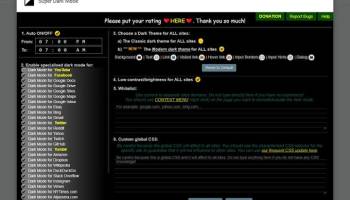
"Dark Mode for Chrome" by Bernard is a sleek and intuitive browser extension designed to enhance your web browsing experience by transforming the bright, often glaring, web pages into a soothing, eye-friendly dark theme. This extension is a perfect solution for users who spend long hours online and are concerned about eye strain or simply prefer the aesthetics of a darker interface.
Upon installation, "Dark Mode for Chrome" seamlessly integrates with your browser, offering a straightforward and user-friendly interface. The extension is incredibly easy to use, with a simple toggle switch that allows you to activate or deactivate dark mode with a single click. This feature is particularly useful for users who may want to switch back to the standard light mode for specific websites or during daytime usage.
One of the standout features of this extension is its ability to intelligently invert colors on web pages, ensuring that images, videos, and other media elements retain their original quality and clarity. Unlike some other dark mode extensions that can distort visuals, Bernard’s creation maintains the integrity of the content, providing a pleasant and consistent browsing experience.
Customization is another strong suit of "Dark Mode for Chrome." Users can personalize their dark mode experience by adjusting the brightness, contrast, and sepia filter to suit their preferences. This level of customization ensures that the extension can cater to a wide range of user needs, from those who require a subtle reduction in brightness to those who prefer a more dramatic transformation.
Performance-wise, the extension is lightweight and efficient, ensuring that it does not slow down your browsing speed or consume excessive system resources. This makes it an ideal choice for users with varying hardware capabilities, from high-end machines to more modest setups.
Security and privacy are also prioritized in Bernard’s design. The extension does not require any unnecessary permissions and operates locally on your browser, meaning it does not collect or transmit any personal data. This focus on privacy will be reassuring to users who are cautious about their online footprint.
In summary, "Dark Mode for Chrome" by Bernard is a thoughtfully designed extension that offers a practical and aesthetically pleasing solution for users seeking a dark theme for their web browsing. Its ease of use, customization options, and commitment to performance and privacy make it a standout choice in the crowded field of browser extensions. Whether you're a night owl, a frequent traveler, or simply someone who appreciates a sleek, modern interface, this extension is sure to enhance your browsing experience.
Upon installation, "Dark Mode for Chrome" seamlessly integrates with your browser, offering a straightforward and user-friendly interface. The extension is incredibly easy to use, with a simple toggle switch that allows you to activate or deactivate dark mode with a single click. This feature is particularly useful for users who may want to switch back to the standard light mode for specific websites or during daytime usage.
One of the standout features of this extension is its ability to intelligently invert colors on web pages, ensuring that images, videos, and other media elements retain their original quality and clarity. Unlike some other dark mode extensions that can distort visuals, Bernard’s creation maintains the integrity of the content, providing a pleasant and consistent browsing experience.
Customization is another strong suit of "Dark Mode for Chrome." Users can personalize their dark mode experience by adjusting the brightness, contrast, and sepia filter to suit their preferences. This level of customization ensures that the extension can cater to a wide range of user needs, from those who require a subtle reduction in brightness to those who prefer a more dramatic transformation.
Performance-wise, the extension is lightweight and efficient, ensuring that it does not slow down your browsing speed or consume excessive system resources. This makes it an ideal choice for users with varying hardware capabilities, from high-end machines to more modest setups.
Security and privacy are also prioritized in Bernard’s design. The extension does not require any unnecessary permissions and operates locally on your browser, meaning it does not collect or transmit any personal data. This focus on privacy will be reassuring to users who are cautious about their online footprint.
In summary, "Dark Mode for Chrome" by Bernard is a thoughtfully designed extension that offers a practical and aesthetically pleasing solution for users seeking a dark theme for their web browsing. Its ease of use, customization options, and commitment to performance and privacy make it a standout choice in the crowded field of browser extensions. Whether you're a night owl, a frequent traveler, or simply someone who appreciates a sleek, modern interface, this extension is sure to enhance your browsing experience.
OS: Windows 11, Windows 10 32/64 bit
Add Your Review or 64-bit Compatibility Report
Top Browser Tools 64-bit downloads


Chrono Download Manager 0.13.10
Effortlessly manage and accelerate your downloads with Chrono Download Manager.
Freeware


Web Archives for Opera 7.3.0
Effortlessly save and manage web pages with this intuitive Opera extension.
Open Source


Mailtrack for Chrome 12.68.6

Mailtrack for Chrome: Email tracking with read receipts for Gmail users.
Shareware | $9.99


TagSpaces Web Clipper for Chrome 4.1.3
Organize your files effortlessly with TagSpaces' intuitive tagging system.
Freeware


Adblock Plus for Chrome 4.36.2
Adblock Plus for Chrome: Efficient ad-blocking for a cleaner browsing experience.
Open Source | $3.50

MetaMask for Chrome 13.24.0
Seamlessly manage your Ethereum assets and interact with decentralized apps.
Open Source
Members area
Top 64-bit Downloads
-
Adobe Flash Player 10
for 64-bit Windows Preview 2
x64 freeware download -
Internet Explorer 8 for
Windows Vista 64-bit and
Windows Server 2008
64-bit
x64 freeware download -
FileZilla Server 1.8.1
x64 open source download -
Firefox 64bit x64 127.0.2
x64 open source download -
SSuite NetSurfer Extreme
x64 2.10.16.1
x64 freeware download -
Google Chrome x64 bit 126.0.6478.127
x64 freeware download -
SSuite NetSurfer Browser
x64 2.30.16.10
x64 freeware download -
AlternaTIFF x64 2.0.8
x64 freeware download -
WatchFTP x64 4.2.1.0
x64 trialware download -
Heroix Longitude for
VMware x64 10.0.1
x64 trialware download
Top Downloads
-
Adobe Flash Player 10
for 64-bit Windows Preview 2
freeware download -
MiraxTV 2024.5
freeware download -
Xftp Free 7.0 B0155
freeware download -
Internet Explorer 8 for
Windows Vista 64-bit and
Windows Server 2008
64-bit
freeware download -
Profile Migrator 1.1
trialware download -
Chrono Download Manager 0.13.10
freeware download -
Web Archives for Opera 7.3.0
open source download -
TheWorld Browser 7.0.0.108
freeware download -
MusicFab 1.0.6.6
demo download -
FileZilla Server 1.8.1
open source download -
Virtual World 4.7.4
commercial download -
Open With Photoshop 63.0
open source download -
NetShareWatcher 1.5.8
shareware download -
Dooble 2024.12.31
open source download -
GetRight 6.5
shareware download