
Synfig Studio - X 64-bit Download
Popular x64 Tags
- photo editor x64 download
- software x64 download
- image editor x64 download
- image editing x64 download
- photos x64 download
- photoshop x64 download
- color x64 download
- design x64 download
- jpeg x64 download
- editor x64 download
- plugin x64 download
- image enhancement x64 download
- watermark x64 download
- exif x64 download
- rotate x64 download
- batch x64 download
- pictures x64 download
- graphics x64 download
- image x64 download
- digital camera x64 download
- photo x64 download
- graphic x64 download
- images x64 download
- resize x64 download
- paint x64 download
- camera x64 download
- digital x64 download
- digital imaging x64 download
- picture x64 download
- jpg x64 download
Synfig Studio 1.5.5
Sponsored links:
license: Open Source
downloads: 97
size: 103.00 MB
updated: 2026-03-16
tags: Synfig Studio, download Synfig Studio, Synfig Studio free download, create 2D animation, bitmap animation, render animation, animation, render, artwork, bitmap
Add to Basket

Robert Quattlebaum

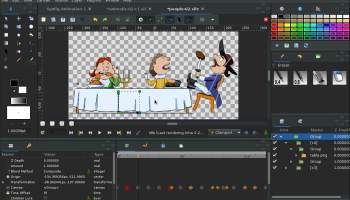
Synfig Studio, a brainchild of Robert Quattlebaum, stands out as a powerful, open-source 2D animation software that caters to both novice animators and seasoned professionals. This robust tool is designed to streamline the animation process, making it accessible without sacrificing depth or quality.
At its core, Synfig Studio offers a vector-based workflow, allowing users to create high-quality animations with smooth, scalable graphics. The software's bone system is particularly noteworthy, enabling users to create complex character rigs with ease. This feature significantly reduces the time and effort required for frame-by-frame animation, making it an invaluable asset for animators looking to produce fluid, lifelike movements.
One of Synfig Studio's standout features is its ability to handle bitmap artwork, giving artists the flexibility to work with both vector and raster images. This dual capability ensures that users are not limited by the type of artwork they prefer, making Synfig Studio a versatile tool in any animator's arsenal.
The software also boasts a comprehensive set of tools for creating and manipulating layers, including geometric, gradient, filter, distortion, and transformation layers. This extensive layer system allows for intricate compositions and effects, providing animators with the creative freedom to bring their visions to life.
Synfig Studio's user interface is designed with efficiency in mind. While it may appear complex at first glance, the layout is intuitive and customizable, allowing users to tailor their workspace to their specific needs. The learning curve is mitigated by a wealth of tutorials and documentation, ensuring that even beginners can quickly get up to speed.
Another significant advantage of Synfig Studio is its support for various file formats, including SVG, PNG, and GIF, as well as its ability to export animations in multiple formats such as AVI, MPEG, and animated GIFs. This flexibility ensures that animations created in Synfig Studio can be easily integrated into different projects and platforms.
Furthermore, Synfig Studio is continuously evolving, thanks to its active community of developers and users. Regular updates and improvements ensure that the software remains at the cutting edge of animation technology, incorporating new features and enhancements based on user feedback.
In summary, Synfig Studio by Robert Quattlebaum is a comprehensive, versatile, and user-friendly 2D animation software that caters to a wide range of artistic needs. Its powerful features, combined with its open-source nature, make it an excellent choice for anyone looking to delve into the world of animation, whether for personal projects or professional endeavors.
At its core, Synfig Studio offers a vector-based workflow, allowing users to create high-quality animations with smooth, scalable graphics. The software's bone system is particularly noteworthy, enabling users to create complex character rigs with ease. This feature significantly reduces the time and effort required for frame-by-frame animation, making it an invaluable asset for animators looking to produce fluid, lifelike movements.
One of Synfig Studio's standout features is its ability to handle bitmap artwork, giving artists the flexibility to work with both vector and raster images. This dual capability ensures that users are not limited by the type of artwork they prefer, making Synfig Studio a versatile tool in any animator's arsenal.
The software also boasts a comprehensive set of tools for creating and manipulating layers, including geometric, gradient, filter, distortion, and transformation layers. This extensive layer system allows for intricate compositions and effects, providing animators with the creative freedom to bring their visions to life.
Synfig Studio's user interface is designed with efficiency in mind. While it may appear complex at first glance, the layout is intuitive and customizable, allowing users to tailor their workspace to their specific needs. The learning curve is mitigated by a wealth of tutorials and documentation, ensuring that even beginners can quickly get up to speed.
Another significant advantage of Synfig Studio is its support for various file formats, including SVG, PNG, and GIF, as well as its ability to export animations in multiple formats such as AVI, MPEG, and animated GIFs. This flexibility ensures that animations created in Synfig Studio can be easily integrated into different projects and platforms.
Furthermore, Synfig Studio is continuously evolving, thanks to its active community of developers and users. Regular updates and improvements ensure that the software remains at the cutting edge of animation technology, incorporating new features and enhancements based on user feedback.
In summary, Synfig Studio by Robert Quattlebaum is a comprehensive, versatile, and user-friendly 2D animation software that caters to a wide range of artistic needs. Its powerful features, combined with its open-source nature, make it an excellent choice for anyone looking to delve into the world of animation, whether for personal projects or professional endeavors.
OS: Windows 11, Windows 10 32/64 bit, Windows 8 32/64 bit, Windows 7 32/64 bit
Add Your Review or 64-bit Compatibility Report
Top Editors 64-bit downloads


CorelDRAW X5 2026 v27.0.0.121
Versatile graphic design suite for vector illustration and layout creation.
Trialware | $269.00

FreeFotoWorks 2026 26.1.3

Photo editing software for beginners and pro. All well-known photo effects.
Freeware


jMonkeyEngine 3.9.0
jMonkeyEngine: Open-source 3D game development engine for Java developers.
Open Source

Adobe Photoshop Elements 2024.3
Powerful yet easy-to-use photo editing software for print, e-mail, and the Web
Trialware | $99.99
Members area
Top 64-bit Downloads
-
Fluid Mask for Mac 3.3.14
x64 trialware download -
ICO file format x64 2.1f1
x64 open source download -
Archicad 64bit 27 B3001
x64 demo download -
WellCAD x64 5.3 B625
x64 demo download -
Portable MicroDicom x64 2024.2
x64 freeware download -
Adobe Photoshop Elements 2024.3
x64 trialware download -
TopSpice 10.26a
x64 demo download -
Potrace for Windows (x64
bit) 1.16
x64 open source download -
delaboratory x64 0.8
x64 open source download -
Photo Ninja 64-bit 1.4.0c
x64 trialware download
Top Downloads
-
CorelDRAW X5 2026 v27.0.0.121
trialware download -
Tracfoil 4.12.07
trialware download -
oCam 428.0
freeware download -
Gyazo 5.9.1
demo download -
MapInfo Professional 17.0.4
trialware download -
iWisdom 0.0.0+2107~ga0785ce1
open source download -
CodeLoader 4.19.0
freeware download -
nanoCAD 5.1.2524.2017
freeware download -
SeiSee 2.22.6
freeware download -
MarvinSketch 23.16.0
freeware download -
VueScan 9.8.52
demo download -
Topaz Simplify 4.1.1
trialware download -
World Tools 2.0.6
shareware download -
Texmod 0.9b
freeware download -
DICOMscope 3.5.1
freeware download