
TopoLT - X 64-bit Download
Popular x64 Tags
- autocad x64 download
- solidworks x64 download
- intellicad x64 download
- dxf x64 download
- dwg x64 download
- architectural x64 download
- visualization x64 download
- cad x64 download
- home x64 download
- design x64 download
- hpgl x64 download
- progecad x64 download
- animation x64 download
- fence x64 download
- cam x64 download
- dwg to pdf x64 download
- architect x64 download
- viz x64 download
- vrml x64 download
- convert x64 download
- gear x64 download
- landscape x64 download
- deck x64 download
- strength check x64 download
- batch x64 download
- garden x64 download
- yard x64 download
- gardening x64 download
- landscaping x64 download
- backyard x64 download
TopoLT 15.2
Sponsored links:

CADWARE Engineering

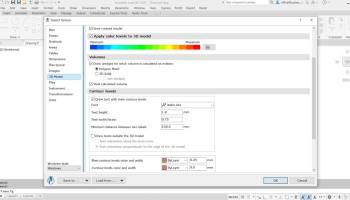
TopoLT is a program offering tools for 2D and 3D aplications and functionalities useful for all those who design topographical or cadastral plans in digital format, who develop 3D terrain models and contours, fill and cut volumes calculation, raster image georeferencing and automatic printing.
TopoLT is running on AutoCAD, BricsCAD or ZWCAD, using the drawing functions of CAD platform and adding specific functions necessary to create topographical and cadastral plans in digital format.
With a tradition of over 25 years, TopoLT is the oldest topography application in Romania, created to help surveyors to carry out topographic and cadastral works. TopoLT is a complete solution for topography and cadastre projects.
FEATURES:
· draws directly points from coordinate files, draws coordinates from total station or sends coordinates from drawing directly to total station;
· point labels can be optimized so that there would be no overlapping between them or with the other entities placed near the point;
· point codes are translated according to a codes interpretation file defined by the user;
· points can be graphically drawn with or without elevations, elevations can be also obtained through interpolation;
· points can be automatically introduced for entities (lines, polylines, arcs, etc.) which don’t have points at margins;
· coordinates of sightshot points (polar points) can be calculated including the possibility to import measurements from the majority of existing total stations;
· measurements can be received from an instrument through serial port;
· points can be selected based on code and point codes can be modified;
· point coordinates can be extracted from drawing and saved in different formats, including formats defined at instruments (total stations) or in formats defined by user;
· coordinates tables for selected points can be created, including a separate table for station points;
· 3D model of the terrain and contour lines can be generated, volumes can be calculated without any restrictions (the volume obtained by intersecting a 3D surface with a plane or the volume between two 3D surfaces of any grid form or triangles);
· 3D models can be cut or joined;
· entities from a drawing with can be visualized in 3D with real time rendering, AVI movies can be saved with moving three-dimensional objects, images can be saved, 3ds files can be visualized, textures can be attached to 3D objects including attachment of images in coordinates for a photo-realistic visualization of 3D models. Visualization is available for functions that create 3D model and perform volumes calculation;
· raster images can be transformed in order to achieve correlation with the coordinates system of the plan and raster images can be both cut and framed at the same time with the process of transformation, raster images can be saved in different formats, colors format can be changed;
· point symbols (blocks) can be inserted, scaled, rotated or deleted based on point codes;
· linetypes can be changed automatically according to the codes interpretation file;
· tables with areas calculation can be created in the drawing or in the arr.tab file. These areas can be recorded in arr.txt file which can be imported in ARIA program database;
· areas can be detached using usual methods from cadastre such as parallel, parallel to one direction, perpendicular, proportional, through an obliged point and with obliged opening;
· the grid can be automaticaly drawn;
· numbered sheets can be created in order to view or print plan by plan when there are chained plans;
· border and title block can be drawn automatically while taking into consideration the printable area and paper format;
TopoLT is running on AutoCAD, BricsCAD or ZWCAD, using the drawing functions of CAD platform and adding specific functions necessary to create topographical and cadastral plans in digital format.
With a tradition of over 25 years, TopoLT is the oldest topography application in Romania, created to help surveyors to carry out topographic and cadastral works. TopoLT is a complete solution for topography and cadastre projects.
FEATURES:
· draws directly points from coordinate files, draws coordinates from total station or sends coordinates from drawing directly to total station;
· point labels can be optimized so that there would be no overlapping between them or with the other entities placed near the point;
· point codes are translated according to a codes interpretation file defined by the user;
· points can be graphically drawn with or without elevations, elevations can be also obtained through interpolation;
· points can be automatically introduced for entities (lines, polylines, arcs, etc.) which don’t have points at margins;
· coordinates of sightshot points (polar points) can be calculated including the possibility to import measurements from the majority of existing total stations;
· measurements can be received from an instrument through serial port;
· points can be selected based on code and point codes can be modified;
· point coordinates can be extracted from drawing and saved in different formats, including formats defined at instruments (total stations) or in formats defined by user;
· coordinates tables for selected points can be created, including a separate table for station points;
· 3D model of the terrain and contour lines can be generated, volumes can be calculated without any restrictions (the volume obtained by intersecting a 3D surface with a plane or the volume between two 3D surfaces of any grid form or triangles);
· 3D models can be cut or joined;
· entities from a drawing with can be visualized in 3D with real time rendering, AVI movies can be saved with moving three-dimensional objects, images can be saved, 3ds files can be visualized, textures can be attached to 3D objects including attachment of images in coordinates for a photo-realistic visualization of 3D models. Visualization is available for functions that create 3D model and perform volumes calculation;
· raster images can be transformed in order to achieve correlation with the coordinates system of the plan and raster images can be both cut and framed at the same time with the process of transformation, raster images can be saved in different formats, colors format can be changed;
· point symbols (blocks) can be inserted, scaled, rotated or deleted based on point codes;
· linetypes can be changed automatically according to the codes interpretation file;
· tables with areas calculation can be created in the drawing or in the arr.tab file. These areas can be recorded in arr.txt file which can be imported in ARIA program database;
· areas can be detached using usual methods from cadastre such as parallel, parallel to one direction, perpendicular, proportional, through an obliged point and with obliged opening;
· the grid can be automaticaly drawn;
· numbered sheets can be created in order to view or print plan by plan when there are chained plans;
· border and title block can be drawn automatically while taking into consideration the printable area and paper format;
OS: Windows XP, Windows Vista, Windows Vista x64, Windows 7, Windows 7 x64, Windows 8, Windows 8 x64, Windows 10, Windows 10 x64, Windows 11
Add Your Review or 64-bit Compatibility Report
Top CAD 64-bit downloads


Tracfoil 4.12.07
Edit and print your ribs and airfoils templates from data
Trialware
tags: Cad, model, aircraft, plane, airfoil plotting, rib plotting, airfoil to DXF, airfoil, plot, rib

nanoCAD 5.1.2524.2017
nanoCAD - easy-to-use free CAD software delivering great user experience.
Freeware


MapInfo Professional 17.0.4
Location-based decisions: Explore, model and act with confidence
Trialware | $1 995.00
DICOMscope 3.5.1
A free DICOM viewer which can display uncompressed, monochrome DICOM images
Freeware


CrystalMaker 11.1.0
A full-featured scientific program, supporting the major database file formats
Demo | $499.00

Members area
Top 64-bit Downloads
-
Fluid Mask for Mac 3.3.14
x64 trialware download -
ICO file format x64 2.1f1
x64 open source download -
Archicad 64bit 27 B3001
x64 demo download -
TopSpice 10.26a
x64 demo download -
WellCAD x64 5.3 B625
x64 demo download -
Portable MicroDicom x64 2024.2
x64 freeware download -
Adobe Photoshop Elements 2024.3
x64 trialware download -
Potrace for Windows (x64
bit) 1.16
x64 open source download -
delaboratory x64 0.8
x64 open source download -
AcroPDF 6.2
x64 shareware download
Top Downloads
-
CorelDRAW X5 2026 v27.0.0.121
trialware download -
Tracfoil 4.12.07
trialware download -
oCam 428.0
freeware download -
Gyazo 5.9.1
demo download -
nanoCAD 5.1.2524.2017
freeware download -
MarvinSketch 23.16.0
freeware download -
MapInfo Professional 17.0.4
trialware download -
iWisdom 0.0.0+2107~ga0785ce1
open source download -
CodeLoader 4.19.0
freeware download -
SeiSee 2.22.6
freeware download -
XnConvert 1.106.0
shareware download -
Scanahand 8.0.0.320
demo download -
VueScan 9.8.53
demo download -
Topaz Simplify 4.1.1
trialware download -
World Tools 2.0.6
shareware download