
Web Archives for Chrome - X 64-bit Download
Popular x64 Tags
- mozilla x64 download
- internet explorer toolbar x64 download
- browser x64 download
- netscape x64 download
- toolbar x64 download
- ie toolbar x64 download
- firefox x64 download
- free toolbar x64 download
- favorites organizer x64 download
- internet explorer x64 download
- favorites x64 download
- internet x64 download
- bookmarks x64 download
- add ons x64 download
- browser toolbar x64 download
- bookmark manager x64 download
- theme x64 download
- explorer x64 download
- addons x64 download
- cache x64 download
- skin x64 download
- web x64 download
- backup x64 download
- golf x64 download
- anarchy bar anarchy x64 download
- golf pro x64 download
- mhfs rss rss feed reader x64 download
- golf leader x64 download
- womens golf x64 download
- ladies golf x64 download
Web Archives for Chrome 7.1.0
Sponsored links:
license: Open Source
downloads: 37
size: 522 kB
updated: 2025-10-12
tags: Web Archives for Chrome, download Web Archives for Chrome, Web Archives for Chrome free download, View Archived Website, Website Archive, Website Cache, Archive, Cache, Website, Webpage
Add to Basket

Armin Sebastian

**Web Archives for Chrome: A Comprehensive Tool for Seamless Web Archiving**
Web Archives for Chrome, developed by Armin Sebastian, is a robust and intuitive browser extension designed to enhance your web browsing experience by providing easy access to a variety of web archiving services. This tool is an invaluable asset for researchers, digital archivists, and anyone keen on preserving web content for future reference.
**Key Features:**
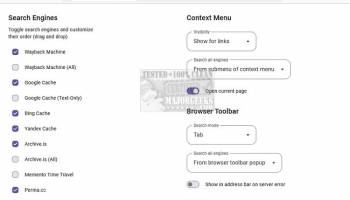
1. **Multi-Service Integration:** Web Archives for Chrome seamlessly integrates with a plethora of web archiving services including the Wayback Machine, archive.today, and perma.cc. This ensures that users have multiple options for accessing archived versions of web pages, enhancing reliability and comprehensiveness.
2. **User-Friendly Interface:** The extension boasts a clean, intuitive interface that makes it incredibly easy to use. With just a few clicks, users can archive a page or retrieve its archived versions, making the process swift and hassle-free.
3. **Context Menu Accessibility:** One of the standout features is the context menu integration. Users can right-click on any link or page and instantly access archiving options, streamlining the workflow and saving valuable time.
4. **Customizable Settings:** Web Archives for Chrome offers a range of customizable settings, allowing users to tailor the extension to their specific needs. Whether you want to prioritize certain archiving services or adjust the interface, the flexibility is at your fingertips.
5. **Privacy-Focused:** The extension is designed with user privacy in mind. It does not collect personal data, ensuring that your browsing habits remain confidential. This commitment to privacy makes it a trustworthy tool for sensitive research and archiving tasks.
6. **Open Source and Actively Maintained:** As an open-source project, Web Archives for Chrome benefits from community contributions and regular updates. This ensures that the extension remains up-to-date with the latest web archiving technologies and user needs.
**Performance and Reliability:**
Web Archives for Chrome is lightweight and performs efficiently without slowing down your browser. It reliably connects to various archiving services, ensuring that you can always find an archived version of the web page you need. The extension's ability to handle multiple services also adds a layer of redundancy, ensuring that even if one service is down, others can fill the gap.
**Use Cases:**
- **Research and Academia:** Ideal for researchers who need to cite web pages and ensure that the content remains accessible over time.
- **Digital Preservation:** Essential for digital archivists who are tasked with preserving web content for historical records.
- **General Browsing:** Useful for everyday users who want to save web pages for future reference or access content that might be taken down.
**Conclusion:**
Web Archives for Chrome by Armin Sebastian is a powerful, user-friendly extension that significantly enhances the web archiving process. Its integration with multiple services, customizable settings, and privacy-focused design make it an indispensable tool for anyone looking to preserve web content. Whether you are a researcher, archivist, or casual user, this extension offers a reliable and efficient solution for all your web archiving needs.
Web Archives for Chrome, developed by Armin Sebastian, is a robust and intuitive browser extension designed to enhance your web browsing experience by providing easy access to a variety of web archiving services. This tool is an invaluable asset for researchers, digital archivists, and anyone keen on preserving web content for future reference.
**Key Features:**
1. **Multi-Service Integration:** Web Archives for Chrome seamlessly integrates with a plethora of web archiving services including the Wayback Machine, archive.today, and perma.cc. This ensures that users have multiple options for accessing archived versions of web pages, enhancing reliability and comprehensiveness.
2. **User-Friendly Interface:** The extension boasts a clean, intuitive interface that makes it incredibly easy to use. With just a few clicks, users can archive a page or retrieve its archived versions, making the process swift and hassle-free.
3. **Context Menu Accessibility:** One of the standout features is the context menu integration. Users can right-click on any link or page and instantly access archiving options, streamlining the workflow and saving valuable time.
4. **Customizable Settings:** Web Archives for Chrome offers a range of customizable settings, allowing users to tailor the extension to their specific needs. Whether you want to prioritize certain archiving services or adjust the interface, the flexibility is at your fingertips.
5. **Privacy-Focused:** The extension is designed with user privacy in mind. It does not collect personal data, ensuring that your browsing habits remain confidential. This commitment to privacy makes it a trustworthy tool for sensitive research and archiving tasks.
6. **Open Source and Actively Maintained:** As an open-source project, Web Archives for Chrome benefits from community contributions and regular updates. This ensures that the extension remains up-to-date with the latest web archiving technologies and user needs.
**Performance and Reliability:**
Web Archives for Chrome is lightweight and performs efficiently without slowing down your browser. It reliably connects to various archiving services, ensuring that you can always find an archived version of the web page you need. The extension's ability to handle multiple services also adds a layer of redundancy, ensuring that even if one service is down, others can fill the gap.
**Use Cases:**
- **Research and Academia:** Ideal for researchers who need to cite web pages and ensure that the content remains accessible over time.
- **Digital Preservation:** Essential for digital archivists who are tasked with preserving web content for historical records.
- **General Browsing:** Useful for everyday users who want to save web pages for future reference or access content that might be taken down.
**Conclusion:**
Web Archives for Chrome by Armin Sebastian is a powerful, user-friendly extension that significantly enhances the web archiving process. Its integration with multiple services, customizable settings, and privacy-focused design make it an indispensable tool for anyone looking to preserve web content. Whether you are a researcher, archivist, or casual user, this extension offers a reliable and efficient solution for all your web archiving needs.
OS: Windows 11, Windows 10 32/64 bit
Add Your Review or 64-bit Compatibility Report
Top Browser Tools 64-bit downloads


Web Archives for Opera 7.3.0
Effortlessly save and manage web pages with this intuitive Opera extension.
Open Source


Mailtrack for Chrome 12.68.4

Mailtrack for Chrome: Email tracking with read receipts for Gmail users.
Shareware | $9.99

TagSpaces Web Clipper for Chrome 4.1.2
Organize your files effortlessly with TagSpaces' intuitive tagging system.
Freeware

MetaMask for Chrome 13.23.0
Seamlessly manage your Ethereum assets and interact with decentralized apps.
Open Source

Kami 2.0.22844
Transform PDFs and documents into interactive, collaborative experiences.
Trialware | $149.00

Chrono Download Manager 0.13.10
Effortlessly manage and accelerate your downloads with Chrono Download Manager.
Freeware
Members area
Top 64-bit Downloads
-
Adobe Flash Player 10
for 64-bit Windows Preview 2
x64 freeware download -
FileZilla Server 1.8.1
x64 open source download -
Internet Explorer 8 for
Windows Vista 64-bit and
Windows Server 2008
64-bit
x64 freeware download -
Firefox 64bit x64 127.0.2
x64 open source download -
SSuite NetSurfer Extreme
x64 2.10.16.1
x64 freeware download -
Google Chrome x64 bit 126.0.6478.127
x64 freeware download -
SSuite NetSurfer Browser
x64 2.30.16.10
x64 freeware download -
WatchFTP x64 4.2.1.0
x64 trialware download -
Xlight FTP Server
Professional x64 3.9.4.2
x64 trialware download -
SoftPerfect Bandwidth
Manager 3.3.0
x64 shareware download
Top Downloads
-
Adobe Flash Player 10
for 64-bit Windows Preview 2
freeware download -
Profile Migrator 1.1
trialware download -
MiraxTV 2024.5
freeware download -
Web Archives for Opera 7.3.0
open source download -
TheWorld Browser 7.0.0.108
freeware download -
MusicFab 1.0.6.6
demo download -
Virtual World 4.7.4
commercial download -
Xftp Free 7.0 B0155
freeware download -
NetShareWatcher 1.5.8
shareware download -
Open With Photoshop 63.0
open source download -
Dooble 2024.12.31
open source download -
MP4 Downloader 6.3.0
trialware download -
Vuze 5.7.7.0
freeware download -
LocalSend 1.17.0
open source download -
NetSpeed 1.1
freeware download