
XnView MP for Mac OS X - X 64-bit Download
Popular x64 Tags
- photo editor x64 download
- software x64 download
- image editor x64 download
- image editing x64 download
- photos x64 download
- photoshop x64 download
- color x64 download
- design x64 download
- jpeg x64 download
- editor x64 download
- plugin x64 download
- image enhancement x64 download
- exif x64 download
- watermark x64 download
- rotate x64 download
- batch x64 download
- pictures x64 download
- graphics x64 download
- image x64 download
- digital camera x64 download
- photo x64 download
- graphic x64 download
- images x64 download
- resize x64 download
- paint x64 download
- camera x64 download
- digital x64 download
- digital imaging x64 download
- picture x64 download
- jpg x64 download
XnView MP for Mac OS X 1.10.3
Sponsored links:
license: Freeware
downloads: 54
size: 55.00 MB
updated: 2026-03-04
tags: XnView MP, download XnView MP, XnView MP free download, Image Viewer, Image Converter, Image Editor, Image, Viewer, View, Converter
Add to Basket

Pierre E Gougelet

XnView MP, developed by Pierre E Gougelet, is a versatile and powerful multimedia viewer, browser, and converter that stands out in the crowded field of image management software. Designed to cater to both amateur photographers and seasoned professionals, XnView MP offers an impressive array of features that make it an indispensable tool for anyone dealing with digital images.
One of the standout features of XnView MP is its extensive format support. The software can read over 500 image formats and export to about 70 different file types, ensuring compatibility with virtually any image file you might encounter. This makes it an excellent choice for users who need to work with a diverse range of file types without the hassle of converting them through multiple programs.
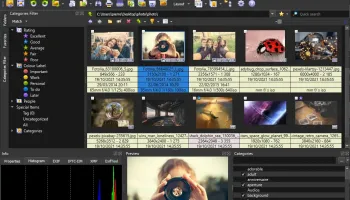
The user interface of XnView MP is both intuitive and highly customizable. It offers a tabbed browsing experience, allowing users to open multiple images and folders simultaneously. The interface can be tailored to fit individual workflows, with options to adjust toolbars, panels, and even the overall layout. This flexibility ensures that users can create a workspace that maximizes their productivity.
XnView MP also excels in its image editing capabilities. While it may not replace dedicated photo editing software like Adobe Photoshop, it provides a robust set of tools for basic to intermediate editing tasks. Users can crop, resize, rotate, and adjust the brightness, contrast, and color balance of their images with ease. Additionally, the software includes a variety of filters and effects that can be applied to enhance or stylize images.
For those who need to manage large collections of images, XnView MP offers powerful organizational tools. Users can categorize images using tags, ratings, and color labels, making it easy to sort and locate specific files. The software also supports batch processing, allowing users to apply changes to multiple images simultaneously, which is a significant time-saver for bulk editing tasks.
Another notable feature is XnView MP's robust metadata support. Users can view and edit EXIF, IPTC, and XMP metadata, which is particularly useful for photographers who need to manage detailed information about their images. The software also includes a duplicate file finder, helping users to identify and remove redundant files, thereby optimizing storage space.
Performance-wise, XnView MP is highly efficient. It is designed to handle large files and extensive image libraries without compromising on speed or stability. The software is available for Windows, macOS, and Linux, ensuring cross-platform compatibility for users who operate in diverse computing environments.
In summary, XnView MP by Pierre E Gougelet is a comprehensive and highly adaptable image management solution. Its extensive format support, customizable interface, robust editing tools, and powerful organizational features make it a top choice for anyone looking to streamline their digital image workflow. Whether you're a casual user or a professional photographer, XnView MP offers the tools and flexibility needed to manage and enhance your image collection effectively.
One of the standout features of XnView MP is its extensive format support. The software can read over 500 image formats and export to about 70 different file types, ensuring compatibility with virtually any image file you might encounter. This makes it an excellent choice for users who need to work with a diverse range of file types without the hassle of converting them through multiple programs.
The user interface of XnView MP is both intuitive and highly customizable. It offers a tabbed browsing experience, allowing users to open multiple images and folders simultaneously. The interface can be tailored to fit individual workflows, with options to adjust toolbars, panels, and even the overall layout. This flexibility ensures that users can create a workspace that maximizes their productivity.
XnView MP also excels in its image editing capabilities. While it may not replace dedicated photo editing software like Adobe Photoshop, it provides a robust set of tools for basic to intermediate editing tasks. Users can crop, resize, rotate, and adjust the brightness, contrast, and color balance of their images with ease. Additionally, the software includes a variety of filters and effects that can be applied to enhance or stylize images.
For those who need to manage large collections of images, XnView MP offers powerful organizational tools. Users can categorize images using tags, ratings, and color labels, making it easy to sort and locate specific files. The software also supports batch processing, allowing users to apply changes to multiple images simultaneously, which is a significant time-saver for bulk editing tasks.
Another notable feature is XnView MP's robust metadata support. Users can view and edit EXIF, IPTC, and XMP metadata, which is particularly useful for photographers who need to manage detailed information about their images. The software also includes a duplicate file finder, helping users to identify and remove redundant files, thereby optimizing storage space.
Performance-wise, XnView MP is highly efficient. It is designed to handle large files and extensive image libraries without compromising on speed or stability. The software is available for Windows, macOS, and Linux, ensuring cross-platform compatibility for users who operate in diverse computing environments.
In summary, XnView MP by Pierre E Gougelet is a comprehensive and highly adaptable image management solution. Its extensive format support, customizable interface, robust editing tools, and powerful organizational features make it a top choice for anyone looking to streamline their digital image workflow. Whether you're a casual user or a professional photographer, XnView MP offers the tools and flexibility needed to manage and enhance your image collection effectively.
OS: Windows 11, Windows 10 32/64 bit, Windows 7 32/64 bit
Add Your Review or 64-bit Compatibility Report
Top Editors 64-bit downloads


CorelDRAW X5 2026 v27.0.0.121

Versatile graphic design suite for vector illustration and layout creation.
Trialware | $269.00

StarSpikes Pro 4.3.1
StarSpikes Pro 4 is an 8bf plug-in - Digital Diffraction Effects for Astroimages
Shareware | $49.95


GIMP 3.0.8 Revision 2
Powerful open-source image editor with advanced features and tools.
Open Source

JPEG Lossless Rotator 11.0
Free app for rotating JPEG images and photos. Fast, simple, and easy to use.
Freeware

RasterVect 27.5
Transform raster images into DXF, WMF, EMF, EPS, and AI vector formats
Trialware | $79.95

AKVIS Chameleon 8.0
Chameleon is an efficient and easy to handle tool for photo collage creation.
Shareware | $75.00


JPEG Lossless Rotator 11.0
Free app for rotating JPEG images and photos. Fast, simple, and easy to use.
Freeware
Members area
Top 64-bit Downloads
-
HyperCam (x64 bit) 2.29.00
x64 freeware download -
CAD6 Industry 2022.1.8.16
x64 trialware download -
SiBELia x64 3.0.6
x64 open source download -
AccuTrans 3D x64 2019.0.0
x64 trialware download -
CorelDRAW 2024 25.0.0.230
x64 trialware download -
XnSketch x64 1.20
x64 freeware download -
RenderMan 24.4.0
x64 freeware download -
PopChar Win 10.1
x64 shareware download -
PixPlant 5.0.49
x64 shareware download -
LazPaint x64 7.2.2
x64 open source download
Top Downloads
-
CorelDRAW X5 2026 v27.0.0.121
trialware download -
MarvinSketch 23.16.0
freeware download -
StarSpikes Pro 4.3.1
shareware download -
FontFinder 3.10.3
open source download -
Flash Catalog Templates
of Red Flowers 1.0
freeware download -
FlashCatalogMaker Free
PDF Converter 1.0
freeware download -
SeiSee 2.22.6
freeware download -
MSU Subtitle Remover
VirtualDub plugin 3.0beta2
freeware download -
PDFBeam PDF to PPT
Converter 10.0
shareware download -
PhotoPDF Photo to PDF
Converter 6.8.0
shareware download -
Serif PagePlus X6
trialware download -
CorelDRAW 2017 19.1.0.419
trialware download -
GIMP 3.0.8 Revision 2
open source download -
XnView 2.52.5
shareware download -
PDF Previewer for
Windows 10 1.02
freeware download