
ZipEnable - X 64-bit Download
Popular x64 Tags
- software x64 download
- network x64 download
- download x64 download
- seo x64 download
- rss reader x64 download
- online tv x64 download
- internet x64 download
- freeware x64 download
- free x64 download
- identity management x64 download
- hardware inventory x64 download
- slow pc performance x64 download
- proxy x64 download
- utility x64 download
- password manager x64 download
- satellite tv for pc x64 download
- email x64 download
- password reset x64 download
- address x64 download
- security x64 download
- server x64 download
- web x64 download
- remote control software x64 download
- pages x64 download
- rss x64 download
- password management x64 download
- active directory x64 download
- why is my computer so slow x64 download
- software distribution x64 download
- software inventory x64 download
ZipEnable 4.0.3.4936
Sponsored links:

Port80 Software, Inc.

HTTP compression speeds up file delivery across the Internet, keeps your users happy with faster page loads, and dramatically reduces bandwidth costs. Compression was non-existent on IIS 4 and broken on IIS 5, but Windows Server 2003 with Internet Information Services (IIS) 6.0 now offers great out-of-the-box compression embedded into the core Web server code itself.
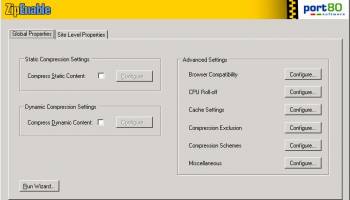
ZipEnable is na application which allows users to easily obtain the absolute most out of IIS 6 built-in compression. While Port80 Software's homepage is the best ISAPI compression solution for Windows Web servers, we highly recommend that you use the internal compression engine in IIS 6.0 - it's lightning fast, incurs minimal resource penalties, and you already bought it when you bought the OS.
The one major drawback to IIS 6.0 native compression is the absence of configuration options via the Web server management interface. IIS 6.0 does not provide a GUI to the majority of controls. Necessities like site level compression, compression schemes, and all advanced settings are only accessible via the IIS metabase.
With ZipEnable, you now have more than an "ON/OFF" choice and can granularly manage IIS 6.0 native compression at the global, site, directory, and file levels -- and all without writing a single line of code or editing the IIS metabase.
You can easily configure compression on all static and dynamic files, including both those that are compressed by default (HTML and ASP) and those that are not (JavaScript, CSS, Cold Fusion, PHP, etc.). ZipEnable also provides real-time browser compatibility checking to make sure that you only send compressed content to browsers that can handle decompression, and CPU roll-off to keep compression CPU cycles within your comfort zone.
FEATURES:
· Global compression configuration
· Enable native HTTP/HTTPS compression on IIS 6.0 for both static (HTML, CSS, JavaScript, XML, Microsoft Office documents, text files and more) and dynamic (ASP, ASP.NET, ColdFusion, PHP, Perl, JSP) files
· Modify compression schemes by file type
· Industry-standard Gzip and Deflate compression schemes
· Set level of compression (1-10) for each scheme
· Granular control of acceptable file extensions for compression
· Site level configuration
· Configure compression at directory and file levels for individual virtual servers (sites)
· Tree view makes for easy navigation and configuration
· Powerful Persistent Overrides feature allows you to keep global and site level compression settings in order
· Browser Compatibility Detection -- the only solution for safe IIS 6.0 compression
· Real-time check identifies a user's browser and automatically delivers compressed/uncompressed content accordingly
· Configure file type exclusions for any browser type/version to avoid incompatibilities
· Includes default exclusions for legacy browsers with known incompatibilities
· CPU Roll-off option
· Automatically dial back compression rates for periods of unusually heavy traffic to guarantee that compression does not overwork your CPU
· Configure CPU utilization threshold for compression roll-off
· Advanced features
· Manage cache directory, size, and location
· Control compression exclusions based on HTTP version, proxy usage, and type of request
· Set priority of default Gzip and Deflate compression schemes
· Adjust other compression settings such as I/0 buffer size and minimum file size to compress limits
· Easy-to-use interfaces
· Configuration wizard makes it simple to apply compression
· GUI, tab-based Settings Manager accessible via the Start menu or IIS MMC
· Command line interface for programmatic control of basic compression settings, ideal for easy IIS 6.0 native compression integration into other applications
· Default settings roll-back option restores IIS 6.0 native compression settings upon ZipEnable uninstallation (roll-back to metabase settings prior to ZipEnable installation)
ZipEnable is na application which allows users to easily obtain the absolute most out of IIS 6 built-in compression. While Port80 Software's homepage is the best ISAPI compression solution for Windows Web servers, we highly recommend that you use the internal compression engine in IIS 6.0 - it's lightning fast, incurs minimal resource penalties, and you already bought it when you bought the OS.
The one major drawback to IIS 6.0 native compression is the absence of configuration options via the Web server management interface. IIS 6.0 does not provide a GUI to the majority of controls. Necessities like site level compression, compression schemes, and all advanced settings are only accessible via the IIS metabase.
With ZipEnable, you now have more than an "ON/OFF" choice and can granularly manage IIS 6.0 native compression at the global, site, directory, and file levels -- and all without writing a single line of code or editing the IIS metabase.
You can easily configure compression on all static and dynamic files, including both those that are compressed by default (HTML and ASP) and those that are not (JavaScript, CSS, Cold Fusion, PHP, etc.). ZipEnable also provides real-time browser compatibility checking to make sure that you only send compressed content to browsers that can handle decompression, and CPU roll-off to keep compression CPU cycles within your comfort zone.
FEATURES:
· Global compression configuration
· Enable native HTTP/HTTPS compression on IIS 6.0 for both static (HTML, CSS, JavaScript, XML, Microsoft Office documents, text files and more) and dynamic (ASP, ASP.NET, ColdFusion, PHP, Perl, JSP) files
· Modify compression schemes by file type
· Industry-standard Gzip and Deflate compression schemes
· Set level of compression (1-10) for each scheme
· Granular control of acceptable file extensions for compression
· Site level configuration
· Configure compression at directory and file levels for individual virtual servers (sites)
· Tree view makes for easy navigation and configuration
· Powerful Persistent Overrides feature allows you to keep global and site level compression settings in order
· Browser Compatibility Detection -- the only solution for safe IIS 6.0 compression
· Real-time check identifies a user's browser and automatically delivers compressed/uncompressed content accordingly
· Configure file type exclusions for any browser type/version to avoid incompatibilities
· Includes default exclusions for legacy browsers with known incompatibilities
· CPU Roll-off option
· Automatically dial back compression rates for periods of unusually heavy traffic to guarantee that compression does not overwork your CPU
· Configure CPU utilization threshold for compression roll-off
· Advanced features
· Manage cache directory, size, and location
· Control compression exclusions based on HTTP version, proxy usage, and type of request
· Set priority of default Gzip and Deflate compression schemes
· Adjust other compression settings such as I/0 buffer size and minimum file size to compress limits
· Easy-to-use interfaces
· Configuration wizard makes it simple to apply compression
· GUI, tab-based Settings Manager accessible via the Start menu or IIS MMC
· Command line interface for programmatic control of basic compression settings, ideal for easy IIS 6.0 native compression integration into other applications
· Default settings roll-back option restores IIS 6.0 native compression settings upon ZipEnable uninstallation (roll-back to metabase settings prior to ZipEnable installation)
OS: Windows XP, Windows Vista, Windows Vista x64, Windows 7, Windows 7 x64
Add Your Review or 64-bit Compatibility Report
Top Other 64-bit downloads


Adobe Flash Player 10 for 64-bit Windows Preview 2
Enables native 64-bit support on Linux operating systems
Freeware


Virtual World 4.7.4
An interactive 3D Virtual World chat with live webcam and avatars support.
Commercial | $1 500.00

Google Apps Manager 7.39.01

Manage Google Workspace accounts and services effortlessly with GAM.
Open Source

Advanced TCP IP Data Logger 5.1.3 Build 310
Log data from one or more Terminal Servers to disk
Demo | $100.00


Lansweeper 12.6.3.5
Comprehensive IT asset management and network discovery solution.
Demo | $219.00

miTaggedMarks 2.01.4
Use tags to organize and access your local collection of bookmarks
Trialware | $20.00
Members area
Top 64-bit Downloads
-
Adobe Flash Player 10
for 64-bit Windows Preview 2
x64 freeware download -
FileZilla Server 1.8.1
x64 open source download -
Internet Explorer 8 for
Windows Vista 64-bit and
Windows Server 2008
64-bit
x64 freeware download -
Firefox 64bit x64 127.0.2
x64 open source download -
SSuite NetSurfer Extreme
x64 2.10.16.1
x64 freeware download -
Google Chrome x64 bit 126.0.6478.127
x64 freeware download -
SSuite NetSurfer Browser
x64 2.30.16.10
x64 freeware download -
AlternaTIFF x64 2.0.8
x64 freeware download -
WatchFTP x64 4.2.1.0
x64 trialware download -
Heroix Longitude for
VMware x64 10.0.1
x64 trialware download
Top Downloads
-
Adobe Flash Player 10
for 64-bit Windows Preview 2
freeware download -
MiraxTV 2024.5
freeware download -
Xftp Free 7.0 B0155
freeware download -
Profile Migrator 1.1
trialware download -
Chrono Download Manager 0.13.10
freeware download -
Web Archives for Opera 7.3.0
open source download -
TheWorld Browser 7.0.0.108
freeware download -
MusicFab 1.0.6.6
demo download -
FileZilla Server 1.8.1
open source download -
Virtual World 4.7.4
commercial download -
Open With Photoshop 63.0
open source download -
Internet Explorer 8 for
Windows Vista 64-bit and
Windows Server 2008
64-bit
freeware download -
NetShareWatcher 1.5.8
shareware download -
Dooble 2024.12.31
open source download -
GetRight 6.5
shareware download